Ever spent an entire evening trying to write a caption, edit a photo, or clean up a messy spreadsheet — only to realize there was probably a faster way? You’re not alone. A few years ago, “AI tool” meant a clunky chatbot that barely understood context. Now it means something you’ll actually use before your coffee gets cold.
I’ve tested dozens of these tools over the past year, some for actual client work and some out of pure curiosity, and a handful genuinely changed how I get things done. This isn’t a theoretical list pulled from a press release — it’s what actually holds up after repeated use. Below you’ll find 15 free AI tools worth trying in 2026, why each one matters, how to pick the right one for your situation, and answers to the questions people ask most often before committing to a tool.
What is an AI Tool?
An AI tool is software that uses machine learning or language models to perform tasks that normally require human judgment — writing, designing, editing, analyzing data, or even holding a conversation. Instead of manually formatting a document or Photoshopping a background, you describe what you want and the tool does the heavy lifting.
A simple example: instead of spending 20 minutes writing a product description from scratch, you type a rough idea into an AI writing tool and get a polished draft in seconds. You still edit it — but you’re not starting from a blank page.
Why AI Tools Matter in 2026
Current Trend or Statistic
AI adoption in everyday workflows has moved past the “early adopter” phase. What used to be a novelty for tech enthusiasts is now baked into browsers, office suites, and even smartphone keyboards. Free tiers have also gotten noticeably more capable — many tools that used to require a paid plan now offer generous free usage limits, which is good news if you’re testing the waters before committing budget.
Who Benefits and How
- Freelancers and small business owners save hours on content, design, and admin work without hiring extra help.
- Students use AI tools to summarize readings, organize notes, and check their own writing.
- Marketers speed up content production without sacrificing quality, as long as there’s a human editing pass.
- Everyday users just want faster, less frustrating ways to handle photos, documents, and daily tasks.
Best AI Tools for 2026 (Reviewed)
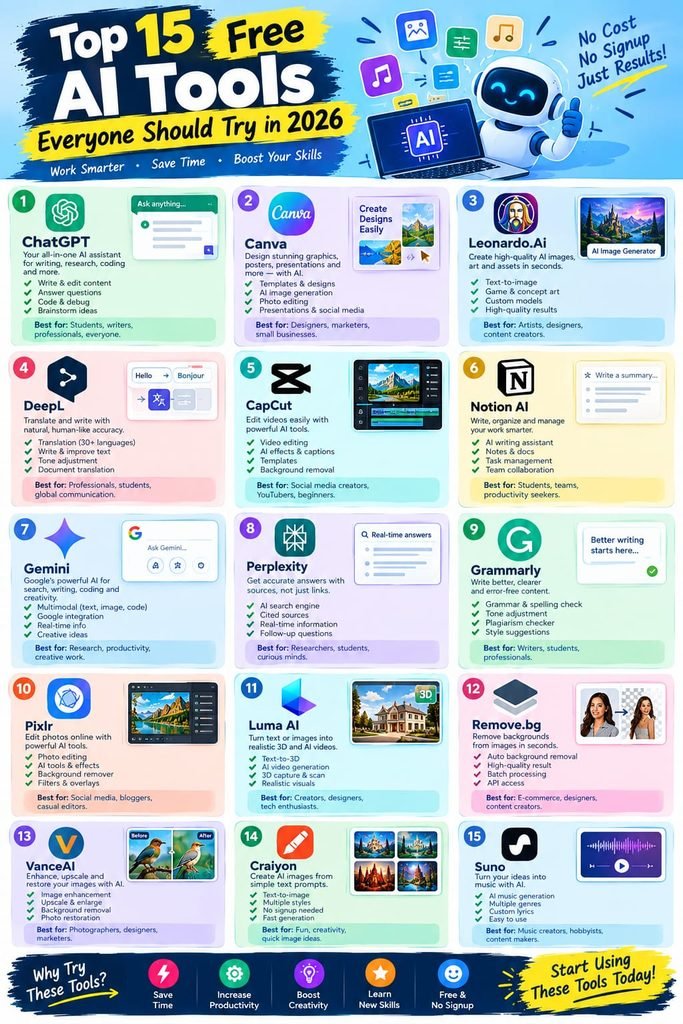
1. ChatGPT (Free Tier)
Features: Conversational AI for writing, brainstorming, coding help, and research summaries. Pros: Extremely versatile, handles almost any text-based task, fast responses. Cons: Free tier has usage limits during peak hours; occasional factual errors. Price: Free, with paid upgrade available. Best for: General-purpose writing and problem-solving.
2. Canva AI (Magic Studio)
Features: AI-powered design suggestions, background removal, text-to-image generation built into Canva’s editor. Pros: Beginner-friendly, huge template library, no design skills needed. Cons: Advanced features are locked behind Canva Pro. Price: Free tier available. Best for: Social media graphics and quick design work.
3. Notion AI
Features: Writing assistance, summarization, and action-item extraction inside your notes and docs. Pros: Integrates directly into your existing workspace, great for meeting notes. Cons: Full AI features often require a paid add-on after a trial period. Price: Free with limited AI credits. Best for: Note-taking and project organization.
4. Grammarly
Features: Grammar, tone, and clarity checking with AI-driven rewrite suggestions. Pros: Works almost everywhere you type — browser, docs, email. Cons: Free version skips advanced tone and plagiarism checks. Price: Free tier available. Best for: Polishing any piece of writing before you hit send.
5. Remove.bg
Features: One-click AI background removal for photos. Pros: Fast, surprisingly accurate on tricky edges like hair. Cons: Free plan limits resolution on downloads. Price: Free with paid HD option. Best for: Product photos and quick image cleanup.
6. Perplexity AI
Features: AI-powered search engine that answers questions with cited sources. Pros: Great for research since it shows where information comes from. Cons: Can be slower than a standard search for very simple queries. Price: Free tier available. Best for: Fact-checking and research-heavy tasks.
7. Descript
Features: AI transcription and text-based video/audio editing. Pros: Editing a video by editing text is a genuine time-saver. Cons: Free plan caps monthly transcription minutes. Price: Free tier available. Best for: Podcasters and content creators editing spoken audio.
8. Otter.ai
Features: Real-time meeting transcription and summarization. Pros: Saves you from manual note-taking during calls. Cons: Accuracy dips with heavy background noise or accents. Price: Free tier available. Best for: Teams that run a lot of virtual meetings.
9. Copilot in Windows
Features: Built-in AI assistant for writing, summarizing, and quick tasks on Windows. Pros: No extra install needed if you’re already on Windows. Cons: Less customizable than standalone AI apps. Price: Free. Best for: Quick everyday tasks without leaving your desktop.
10. Runway ML (Free Tier)
Features: AI video editing tools including background removal and generative effects. Pros: Powerful for creative experimentation. Cons: Free credits run out quickly with video work. Price: Free with limited credits. Best for: Creators experimenting with AI video effects.
11. QuillBot
Features: AI paraphrasing and summarizing tool. Pros: Useful for rewording awkward sentences or condensing long text. Cons: Free version limits word count per rewrite. Price: Free tier available. Best for: Students and writers reworking drafts.
12. Leonardo AI
Features: AI image generation with fine-tuned style controls. Pros: More creative control than many free alternatives. Cons: Daily free generation limit. Price: Free with daily credits. Best for: Designers and hobbyists making custom artwork.
13. Google Gemini (Free Tier)
Features: Conversational AI integrated with Google Workspace. Pros: Works smoothly if you already live in Gmail and Docs. Cons: Some advanced features need a Google One AI subscription. Price: Free. Best for: Anyone already using Google’s ecosystem daily.
14. Fireflies.ai
Features: Meeting recorder and AI note-taker with searchable transcripts. Pros: Good for teams that need a searchable meeting archive. Cons: Free plan limits storage and transcription credits. Price: Free tier available. Best for: Teams needing meeting records without manual note-taking.
15. Speechify
Features: Text-to-speech AI that reads articles, PDFs, and documents aloud. Pros: Great for multitasking or auditory learners. Cons: Free voices sound less natural than premium ones. Price: Free tier available. Best for: Listening to long-form content on the go.
How to Choose the Right Tool
Factor 1: What’s the actual task?
Don’t pick a tool because it’s trending — pick it because it solves the specific bottleneck in your workflow. If you’re stuck on writing, a design tool won’t help you.
Factor 2: Free tier limits
Every “free” tool has a catch somewhere — usage caps, watermark exports, or feature gating. Test the free version with real work before assuming it’ll cover your ongoing needs.
Step-by-Step: How to Start Using AI Tools
Step 1: Identify your biggest time-sink
Look at what eats the most hours in your week — writing, editing, research, or admin — and start there.
Step 2: Test two or three tools for that task
Don’t commit to the first one you try. Run the same task through two or three options to see which output actually matches your style.
Step 3: Build it into your routine
The real value shows up after a few weeks of consistent use, not the first time you try it.
Comparison Table
| Tool | Price | Best Feature | Rating |
|---|---|---|---|
| ChatGPT | Free / Paid | General writing & problem-solving | 4.7/5 |
| Canva AI | Free / Paid | Design + background removal | 4.6/5 |
| Notion AI | Free / Paid | In-workspace writing assist | 4.4/5 |
| Grammarly | Free / Paid | Grammar & tone checking | 4.5/5 |
| Remove.bg | Free / Paid | Background removal | 4.5/5 |
| Perplexity AI | Free / Paid | Cited research answers | 4.6/5 |
| Descript | Free / Paid | Text-based video editing | 4.4/5 |
Common Mistakes to Avoid
- Relying on AI output without editing it. Every tool on this list needs a human pass before publishing or sending anything important.
- Ignoring free-tier limits. Hitting a wall mid-project is frustrating — check usage caps before you start a big task.
- Using one tool for everything. Most AI tools are good at one or two things, not everything. Match the tool to the task.
Pros and Cons Summary
Pros: Saves time, lowers the barrier for tasks you’re not naturally skilled at, and most tools are genuinely free to start. Cons: Free limits can interrupt workflow, output still needs human review, and some tools have a learning curve.
Conclusion
AI tools in 2026 aren’t a gimmick anymore — they’re genuinely useful shortcuts for writing, designing, editing, and organizing your day. The key is picking the right tool for the right task and always giving the output a human review before it goes live. Start with one or two from this list that match your biggest time-sink, and build from there.