
Staring at a blank document while the deadline creeps closer is one of the most universal frustrations out there — whether you’re writing a blog post, a product description, or just an email that needs to sound right. AI writing tools won’t do the thinking for you, but they’ll get rid of the blank-page problem fast, and that alone can save hours.
I write regularly for work, and the biggest shift over the last year hasn’t been AI replacing writing — it’s AI removing the friction of starting. Below are 10 AI writing tools worth trying, what each one actually does well, and how to avoid the common trap of publishing something that reads like it was written by a robot.
What is an AI Writing Tool?
An AI writing tool uses a language model to help generate, edit, or improve written content. You give it a prompt or existing text, and it produces a draft, suggestion, or rewrite based on what you asked for.
For example, instead of drafting a cold outreach email from scratch, you describe who you’re writing to and what you want, and the tool gives you a starting draft you can then adjust to sound like yourself.
Why AI Writing Tools Matter in 2026
Current Trend or Statistic
Content demands have grown across nearly every industry — more blogs, more product listings, more social captions, more internal documentation. AI writing tools have become the practical answer to that volume increase, letting individuals and small teams produce at a pace that used to require a much larger team.
Who Benefits and How
- Bloggers and marketers speed up first drafts and repurpose content across formats.
- Small business owners write product descriptions and emails without hiring a copywriter.
- Students get help outlining essays and rephrasing awkward sentences.
- Non-native English speakers use these tools to polish grammar and tone before publishing.
Best AI Writing Tools (Reviewed)
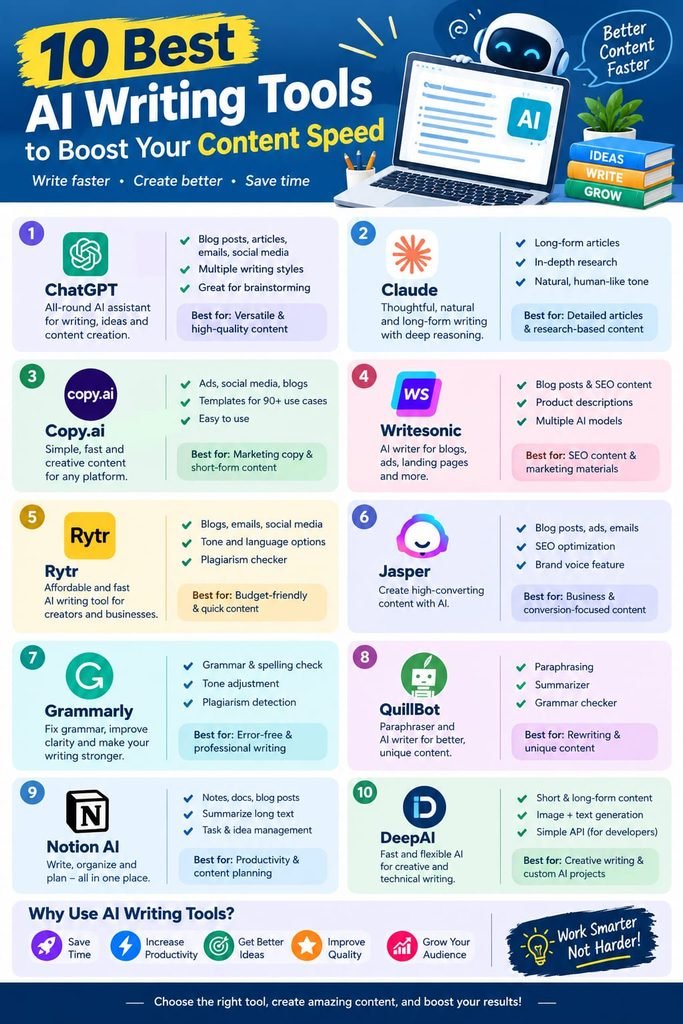
1. ChatGPT
Features: General-purpose writing assistant for drafts, outlines, and rewrites. Pros: Extremely flexible, handles almost any writing task or tone. Cons: Needs clear prompting to avoid generic-sounding output. Price: Free tier available. Best for: All-around writing help, from blog drafts to emails.
2. Jasper
Features: Marketing-focused AI writing with brand voice training. Pros: Strong for long-form content and consistent brand tone across a team. Cons: No meaningful free tier — pricier than most alternatives. Price: Paid, with a free trial. Best for: Teams producing marketing content at scale.
3. Copy.ai
Features: Templates for ad copy, product descriptions, and social captions. Pros: Fast for short-form marketing content. Cons: Long-form output often needs heavier editing. Price: Free tier available. Best for: Quick marketing copy and social media captions.
4. Grammarly
Features: Grammar, clarity, and tone correction with AI rewrite suggestions. Pros: Works across almost every app you type in. Cons: Free version skips advanced tone detection and plagiarism checks. Price: Free tier available. Best for: Polishing a draft rather than generating one from scratch.
5. QuillBot
Features: Paraphrasing, summarizing, and grammar checking. Pros: Excellent for rewording sentences without losing meaning. Cons: Free plan caps word count per rewrite. Price: Free tier available. Best for: Reworking existing drafts into cleaner phrasing.
6. Writesonic
Features: Blog posts, ads, and product descriptions with SEO suggestions built in. Pros: Decent free tier for testing before committing. Cons: Output quality varies more than premium competitors. Price: Free tier available. Best for: Bloggers wanting SEO-aware first drafts.
7. Rytr
Features: Short and long-form content generation across dozens of use cases. Pros: Affordable, simple interface, good for beginners. Cons: Free tier has a low monthly character limit. Price: Free tier available. Best for: Casual users testing AI writing without a big commitment.
8. Hemingway Editor
Features: Readability scoring and sentence simplification (not generative, but essential for editing). Pros: Forces cleaner, punchier writing — pairs well with any AI draft. Cons: Doesn’t generate content, only edits existing text. Price: Free (web version). Best for: Tightening up AI-generated drafts before publishing.
9. Notion AI
Features: In-document writing assistance, summarizing, and action item extraction. Pros: Convenient if you already organize work in Notion. Cons: Full AI access usually needs a paid add-on after trial credits run out. Price: Free with limited AI credits. Best for: Writing within your existing notes and project docs.
10. Google Gemini
Features: Conversational AI integrated into Docs, Gmail, and Workspace. Pros: Convenient for anyone already working inside Google’s ecosystem. Cons: Some advanced features require a Google One AI subscription. Price: Free tier available. Best for: Drafting and editing directly inside Google Docs.
How to Choose the Right Tool
Factor 1: Short-form vs. long-form needs
Tools like Copy.ai shine for quick captions and ad copy, while Jasper and ChatGPT handle long-form drafts better. Match the tool to the length of what you’re actually writing.
Factor 2: How much editing you’re willing to do
Every AI draft needs a human pass. Some tools produce cleaner first drafts than others — if you have less time to edit, prioritize the tools known for stronger raw output, like ChatGPT or Jasper.
Step-by-Step: How to Use an AI Writing Tool Effectively
Step 1: Write a clear, specific prompt
Vague prompts produce generic output. Include the tone, audience, and purpose of the piece.
Step 2: Generate a draft, then edit heavily
Treat the AI output as a first draft, not a final product. Rewrite sections that sound flat or repetitive.
Step 3: Run it through a grammar and readability check
Tools like Grammarly or Hemingway Editor catch issues the generation tool missed.
Comparison Table
| Tool | Price | Best Feature | Rating |
|---|---|---|---|
| ChatGPT | Free / Paid | Flexible all-purpose writing | 4.7/5 |
| Jasper | Paid | Brand voice for marketing teams | 4.5/5 |
| Copy.ai | Free / Paid | Fast short-form copy | 4.3/5 |
| Grammarly | Free / Paid | Grammar & tone polishing | 4.5/5 |
| QuillBot | Free / Paid | Paraphrasing existing drafts | 4.4/5 |
| Writesonic | Free / Paid | SEO-aware blog drafts | 4.2/5 |
Common Mistakes to Avoid
- Publishing the first AI draft as-is. It almost always needs restructuring, personal examples, and a voice pass.
- Using overly generic prompts. The more specific your instructions, the less “AI-sounding” the output will be.
- Ignoring plagiarism and AI-detection checks. Always run final content through a checker before publishing, especially for client work.
Pros and Cons Summary
Pros: Dramatically speeds up first drafts, helps overcome writer’s block, and most tools offer a usable free tier. Cons: Raw output often sounds generic, free tiers have usage caps, and heavy editing is still required for quality content.
Conclusion
AI writing tools won’t replace good writing, but they will remove the blank-page problem and speed up everything from outlines to final drafts. The trick is choosing the right tool for the job and always giving the output a real editing pass before it goes live.