
You’ve got a blog post idea, but before you write a single word, there’s one question that decides whether anyone will ever find it: are people actually searching for this? Keyword research answers that question — and the good news is you don’t need an expensive SEO subscription to get started.
There are plenty of free tools that give bloggers real search volume, competition data, and content ideas without spending a dime. The trick is knowing which ones are genuinely useful versus which ones dangle a “free” label just to funnel you into a paid upgrade. Here’s a breakdown of the best free keyword research tools for bloggers in 2026, what each one is actually good at, and how to combine them into a workflow that doesn’t cost anything.
What Is Keyword Research?
Keyword research is the process of finding the exact words and phrases people type into search engines, so you can shape your content around what people are actually looking for. It typically includes checking search volume (how many people search a term monthly), competition or difficulty (how hard it is to rank), and related questions people ask around that topic.
For example, a food blogger planning a post might discover that “air fryer chicken thighs” gets steady monthly searches with manageable competition, while “chicken thighs recipe” is far more competitive — so they build the post around the more specific, winnable phrase instead.
Why Keyword Research Matters in 2026
Search Has Gotten More Competitive
With more content being published than ever, targeting the right specific phrase — rather than a broad, crowded term — is often the difference between a post that ranks on page one and one that never gets found.
Who Benefits From Free Keyword Tools
- New bloggers who need direction before investing in paid SEO software
- Niche site owners validating whether a topic has enough search demand to be worth writing about
- Small business owners writing their own blog content without an SEO team
- Content planners looking for FAQ and subtopic ideas to round out a post
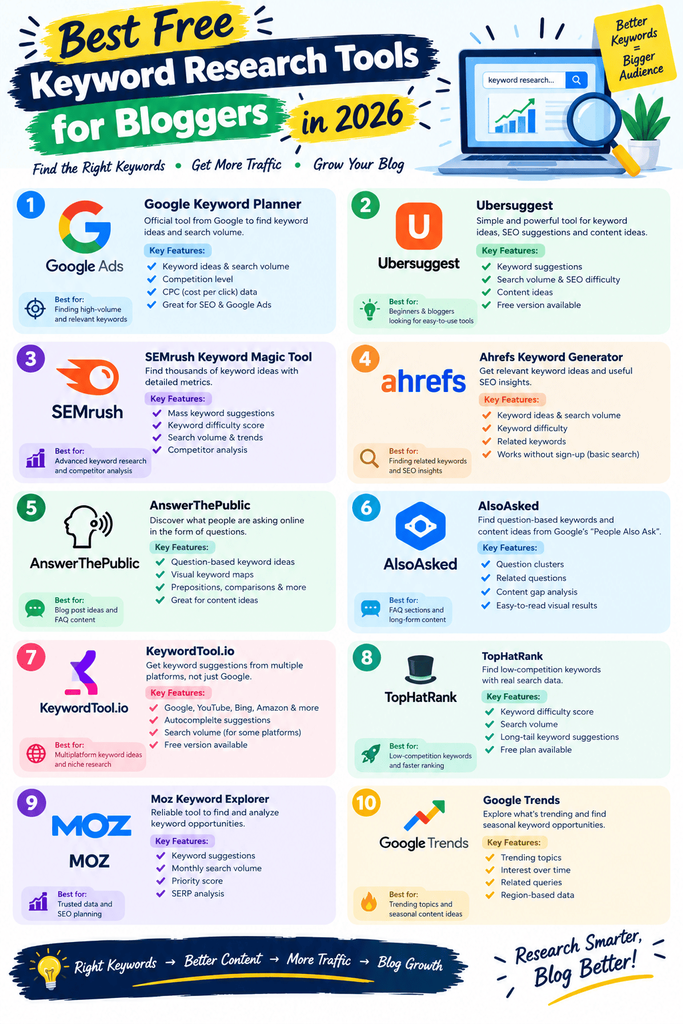
Best Free Keyword Research Tools (Reviewed)
1. Google Keyword Planner
Price: Completely free (no Google Ads spend required) This is usually the first stop for good reason — it pulls search volume data straight from Google itself, rather than an estimate. You don’t need to be running ads to use it; a free Google Ads account is all it takes.
- Pros: Data straight from Google, completely free, no daily search limits
- Cons: Numbers are often shown as broad ranges rather than exact figures; no organic difficulty score
- Best for: Getting a reliable, Google-sourced read on search volume before committing to a topic
2. Google Search Console
Price: Completely free Search Console doesn’t help you find new keywords, but it shows you which keywords you’re already ranking for — including ones you didn’t intentionally target. It’s one of the most underused free tools bloggers have.
- Pros: Shows real ranking and click data for your own site, completely free, integrates with Google Analytics
- Cons: Only useful once your site has some existing traffic and history
- Best for: Finding “low-hanging fruit” keywords you’re already ranking for on page two, just below the top results
3. Google Trends
Price: Completely free Trends won’t give you exact search volume, but it shows you whether interest in a topic is rising, falling, or seasonal — which matters a lot for planning content timing.
- Pros: Great for spotting seasonal patterns and rising topics early, completely free, simple to use
- Cons: No absolute search volume numbers, only relative interest over time
- Best for: Deciding when to publish seasonal content, or catching a topic before it peaks
4. Ubersuggest
Price: Free tier (3 searches/day); paid plans start around $29/month, with a one-time lifetime option historically available Neil Patel’s Ubersuggest has been a go-to free option for years. The free tier is genuinely useful for occasional research, though the daily search cap will push frequent users toward a paid plan quickly.
- Pros: Includes a difficulty score and competitor analysis on top of volume data, beginner-friendly interface, free CSV export
- Cons: Only 3 free searches per day; expect frequent upgrade prompts
- Best for: Bloggers who need occasional deeper data (difficulty scores, competitor keywords) beyond what Google’s own tools show
5. AnswerThePublic
Price: Free tier (3–5 searches/day depending on current limits); Pro plans start around $5–9/month This tool organizes real Google Autocomplete questions into visual clusters — who, what, when, why, how — making it one of the best free sources for FAQ sections and subtopic ideas.
- Pros: Excellent for generating question-based content ideas, visually organized, free CSV export
- Cons: Limited daily searches on the free tier; not a full keyword research suite on its own
- Best for: Planning FAQ sections and finding the exact phrasing people use when asking questions about your topic
6. Ahrefs Webmaster Tools
Price: Free (a separate, limited product from Ahrefs’ paid suite) This is a free, site-verification-based version of Ahrefs aimed at giving site owners a taste of Ahrefs’ data without the full subscription cost.
- Pros: Access to real Ahrefs backlink and site health data at no cost, more generous than most “free” competitor tools
- Cons: Limited to your own verified site, not for researching general keyword ideas
- Best for: Checking your own site’s technical SEO health and backlinks without paying for full Ahrefs access
7. Bing Webmaster Tools
Price: Completely free Often overlooked, Bing’s version of Search Console offers its own keyword research tool with volume estimates, plus insight into how your site performs specifically on Bing.
- Pros: Completely free, includes its own keyword suggestion tool, useful second data point beyond Google
- Cons: Smaller search share means less relevant data if your audience is entirely Google-based
- Best for: Cross-checking Google Keyword Planner data with a second, independent source
8. AlsoAsked
Price: Free tier with limited searches; paid plans available for higher volume AlsoAsked visualizes the “People Also Ask” questions from Google search results, mapped out as a branching tree — genuinely useful for outlining a post’s H2s and H3s.
- Pros: Great for structuring an article outline around real search questions, free tier is usable for occasional research
- Cons: Search limits on the free plan; less useful for volume/difficulty data
- Best for: Outlining blog posts around the exact questions Google already surfaces for a topic
9. Keywords Everywhere
Price: Free browser extension install; requires purchasing low-cost credits to view keyword data This browser extension overlays search volume directly onto Google search results and other sites, which is convenient — but unlike most tools here, it’s not genuinely free since data requires purchased credits.
- Pros: Convenient in-browser data without switching tabs, low-cost credit system
- Cons: No functional free tier for actual data; credits run out and need topping up
- Best for: Bloggers who want inline keyword data while browsing, and don’t mind a small ongoing cost
10. LowFruits
Price: Free trial available; paid plans required for ongoing use LowFruits specializes in finding “low competition” keywords by analyzing weak spots in the current search results — forums, small blogs, and low-authority pages ranking for a term.
- Pros: Specifically built to surface winnable keywords for newer sites, unique competition-gap analysis
- Cons: Free access is trial-only, not an ongoing free tier
- Best for: New blogs that need to find realistically rankable keywords rather than competing head-on with established sites
How to Choose the Right Tool
Factor 1: What Stage Your Blog Is At
Brand-new blogs benefit most from tools that surface low-competition opportunities, like LowFruits or AnswerThePublic, rather than chasing high-volume terms they can’t realistically rank for yet. Established blogs get more value from Google Search Console, since it reveals real ranking data you can act on immediately.
Factor 2: How Often You Need to Research
If you’re only planning a handful of posts a month, the daily search caps on Ubersuggest or AnswerThePublic’s free tiers are usually enough. If you’re researching keywords constantly, it’s worth combining several free tools to avoid hitting limits on any single one.
Step-by-Step: How to Research Keywords for a Blog Post
Step 1: Start With a Broad Seed Topic
Enter your general topic idea into Google Keyword Planner or Ubersuggest to see related keyword suggestions and rough search volume.
Step 2: Narrow Down to a Specific, Winnable Phrase
Look for a more specific variation of your seed keyword with decent search volume and lower apparent competition — specific, longer phrases are almost always easier to rank for than broad, single-word terms.
Step 3: Gather Questions and Subtopics
Run your chosen keyword through AnswerThePublic or AlsoAsked to collect the real questions people ask, and use these to build your article’s H2 and H3 outline.
Step 4: Check What’s Already Ranking
Search your target keyword in Google directly and skim the top-ranking results — this tells you what format (listicle, guide, comparison) Google currently favors for that phrase.
Comparison Table
| Tool | Price | Best Feature | Rating |
|---|---|---|---|
| Google Keyword Planner | Free | Search volume straight from Google | 4.5/5 |
| Google Search Console | Free | Real ranking data for your own site | 4.6/5 |
| Google Trends | Free | Seasonal and trending topic insight | 4.3/5 |
| Ubersuggest | Free (3/day)–$29/mo | Difficulty scores + competitor data | 4.3/5 |
| AnswerThePublic | Free (limited)–$5-9/mo | Question-based content ideas | 4.4/5 |
| Ahrefs Webmaster Tools | Free | Free backlink and site health data | 4.2/5 |
| Bing Webmaster Tools | Free | Second data source beyond Google | 4.0/5 |
| AlsoAsked | Free (limited)–paid tiers | Visual “People Also Ask” mapping | 4.3/5 |
| Keywords Everywhere | Free install + credits | In-browser keyword overlay | 4.0/5 |
| LowFruits | Free trial–paid | Finds low-competition keyword gaps | 4.2/5 |
Common Mistakes to Avoid
- Chasing high-volume keywords too early. New blogs rarely rank for broad, high-competition terms — go after specific, less contested phrases first.
- Relying on a single tool’s data. Search volume estimates vary between tools; cross-checking two sources gives a more realistic picture.
- Ignoring search intent. A keyword with great volume is useless if the top results are all product pages and you’re writing a blog post, or vice versa.
- Skipping the “People Also Ask” step. These questions are often easier ranking opportunities than the main keyword itself.
- Forgetting to revisit old research. Search trends shift — a quick monthly check on your existing content’s keywords can reveal new opportunities.
Pros and Cons Summary
Pros of using free keyword research tools:
- Removes the guesswork from choosing blog topics
- Costs nothing to get started
- Multiple tools can be combined for a fuller picture
- Helps new blogs find realistically rankable opportunities
Cons to keep in mind:
- Free tiers often cap daily searches or hide exact numbers
- Data quality and volume estimates vary between tools
- Serious, high-volume blogging eventually benefits from a paid tool like Ahrefs or Semrush
Conclusion
You don’t need an expensive SEO subscription to do solid keyword research as a blogger. Google’s own free tools — Keyword Planner, Search Console, and Trends — cover the fundamentals, and pairing them with AnswerThePublic or AlsoAsked rounds out your content planning with real questions people are asking.
Start with the free tools above, and only consider upgrading to a paid platform once you’ve outgrown their daily limits or need deeper competitive data than they provide.